Sudoku
Embed a fully native Sudoku puzzle into your mobile app with minimal code.
@State private var model = SudokuGameModel.example

SudokuGameView(model: $model)
What's included
Quick integration
Embed a fully native Sudoku puzzle into your mobile app with minimal code.
Customise grid & input
Swap in your own grid cells and input pad components with a simple modifier.
Input & completion callbacks
React to every player move and puzzle completion with lightweight event hooks.
Adaptive portrait & landscape
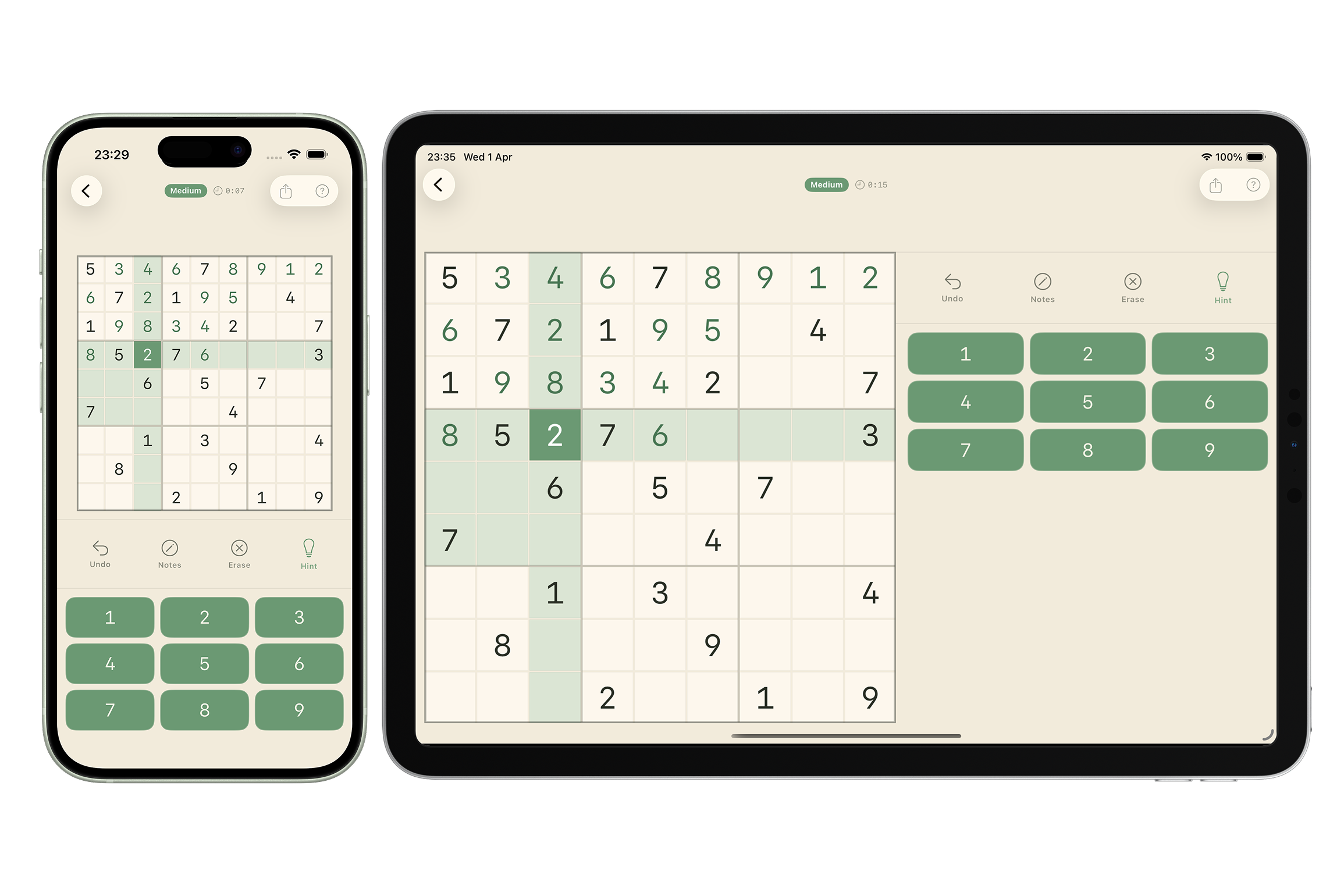
Layout adapts automatically on iOS and Android — grid and accessory slot reposition for portrait and landscape.
Quick integration
Render a fully playable puzzle with a single line of code by passing in a puzzle model.
@State private var model = SudokuGameModel.example
@State private var isNotesMode = false

var body: some View {
    SudokuGameView(model: $model, isNotesMode: $isNotesMode)
}
The model
SudokuGameModel holds the full game state — initial grid, solution, live player entries, and optional pencil marks. Pass it as a binding and the model stays in sync automatically as the player fills in cells.
@State private var model = SudokuGameModel(
    grid: [
        [5, 3, nil, nil, 7, nil, nil, nil, nil],
        [nil, 7, nil, 1, nil, nil, nil, 4, nil],
        // …
    ],
    solution: [
        [5, 3, 4, 6, 7, 8, 9, 1, 2],
        [6, 7, 2, 1, 9, 5, 3, 4, 8],
        // …
    ]
)

// model.grid             — initial puzzle (nil = editable cell)
// model.solution         — complete solved board
// model.state            — player's current entries, updated live
// model.notes            — optional per-cell pencil marks [[Set<Int>]]?
// model.isComplete       — true once every cell is filled
// model.isCorrect        — true when all entries match the solution
// model.reset()          — restores state to grid and clears notes
Custom model
SudokuGameView is generic over SudokuGameModelProtocol — implement the protocol to supply your own model with custom logic, computed state, or additional properties. isComplete and isCorrect are provided free via a protocol extension.
public protocol SudokuGameModelProtocol: Sendable {
    var grid: [[Int?]] { get }
    var solution: [[Int]] { get }
    var state: [[Int?]] { get set }
    var notes: [[Set<Int>]]? { get set }
    mutating func reset()
    // isComplete and isCorrect are provided free via a protocol extension
}
Conform to the protocol and pass your model directly to SudokuGameView:
struct MyModel: SudokuGameModelProtocol {
    var grid: [[Int?]]
    var solution: [[Int]]
    var state: [[Int?]]
    var notes: [[Set<Int>]]?

    mutating func reset() {
        state = grid
        notes = nil
    }
    // isComplete and isCorrect are provided by the protocol extension
}

@State private var model = MyModel(…)
SudokuGameView(model: $model)
Customise grid
Control the spacing between cells, customise the 3×3 block divider colour and thickness, and swap in your own custom cell view.
@State private var model = SudokuGameModel.example
@State private var isNotesMode = false

SudokuGameView(model: $model, isNotesMode: $isNotesMode)
    .grid(spacing: 2, cell: MyCell.self, dividerColor: .black, dividerThickness: 1.5)
Your custom cell conforms to a protocol that receives four values — whether the cell is selected, the digit to display, whether the cell is pre-filled and locked, and an optional set of pencil-mark candidates.
struct MyCell: SudokuCellProtocol {
    var isSelected: Bool
    var text: String
    var isFixed: Bool
    var notes: Set<Int>?

    init(isSelected: Bool, text: String, isFixed: Bool, notes: Set<Int>? = nil) {
        self.isSelected = isSelected
        self.text = text
        self.isFixed = isFixed
        self.notes = notes
    }

    private let noteColumns = Array(repeating: GridItem(.flexible(), spacing: 0), count: 3)

    var body: some View {
        Rectangle()
            .fill(isFixed ? Color.green : (isSelected ? Color.blue : Color.gray))
            .overlay {
                ZStack {
                    // Notes layer — only when the cell is empty
                    if text.isEmpty, let notes, !notes.isEmpty {
                        LazyVGrid(columns: noteColumns, spacing: 0) {
                            ForEach(1...9, id: \.self) { digit in
                                Text(notes.contains(digit) ? "\(digit)" : "")
                                    .font(.system(size: 8, weight: .regular))
                                    .foregroundStyle(.white.opacity(0.85))
                                    .minimumScaleFactor(0.5)
                            }
                        }
                        .padding(2)
                    }
                    // Always present — stable identity ensures contentTransition
                    // fires even when filling an empty cell for the first time.
                    Text(text)
                        .font(.headline)
                        .foregroundStyle(.white)
                        .contentTransition(.numericText())
                        .animation(.default, value: text)
                }
            }
    }
}
Customise input
Replace the default number pad with your own custom input button component. Conform to InputPadCellProtocol and pass your type to the .input(cell:) modifier.
struct MyPadButton: InputPadCellProtocol {
    var label: String
    var onTap: () -> Void

    init(label: String, onTap: @escaping () -> Void) {
        self.label = label
        self.onTap = onTap
    }

    var body: some View {
        Button(action: onTap) {
            Text(label)
                .font(.headline)
                .frame(maxWidth: .infinity)
                .padding(.vertical, 10)
                .background(Color.blue)
                .foregroundStyle(.white)
                .clipShape(RoundedRectangle(cornerRadius: 8))
        }
    }
}@State private var model = SudokuGameModel.example
SudokuGameView(model: $model)
.input(cell: MyPadButton.self)Notes mode
Notes mode lets the player pencil in candidate digits without committing to an answer. Pass an isNotesMode binding to SudokuGameView and toggle it from your own control — a toolbar item, a button in the accessory view, or any other element in your layout. Entering a digit in normal mode automatically clears that cell's notes.
@State private var model = SudokuGameModel.example
@State private var isNotesMode = false

var body: some View {
    VStack {
        // Drive this toggle from anywhere — toolbar, button, custom control
        Toggle("Notes", isOn: $isNotesMode)
        SudokuGameView(model: $model, isNotesMode: $isNotesMode)
    }
}
Accessory view
Insert any custom view between the grid and the number pad using .accessoryView {} on iOS or the accessorySlot parameter on Android. In portrait mode it appears below the grid; in landscape it stacks above the number pad in the right column. This is the recommended place to add a notes toggle, an undo button, or any other game control.
@State private var model = SudokuGameModel.example
@State private var isNotesMode = false

SudokuGameView(model: $model, isNotesMode: $isNotesMode)
    .accessoryView {
        Button {
            isNotesMode.toggle()
        } label: {
            Text(isNotesMode ? "Notes ON" : "Notes OFF")
                .frame(maxWidth: .infinity)
                .padding()
                .background(isNotesMode ? Color.blue : Color.gray.opacity(0.2))
                .foregroundStyle(isNotesMode ? .white : .primary)
                .clipShape(RoundedRectangle(cornerRadius: 8))
        }
    }
Protocols
SudokuGameView is built around three protocols — each one is an extension point you can implement to replace a specific part of the view with your own logic or appearance.
SudokuGameModelProtocolThe model contract. Implement to supply a custom data source — useful when you need computed state, external data, or additional properties beyond what SudokuGameModel provides.
SudokuCellProtocolThe cell view contract. Implement to control how each grid cell looks — selection, fixed state, digit display, and pencil marks are all passed in.
InputPadCellProtocolThe number-pad button contract. Implement to replace the default number buttons with your own styled component.
// Drives the game — implement to supply a custom data source
public protocol SudokuGameModelProtocol: Sendable {
    var grid: [[Int?]] { get }           // initial puzzle (nil = editable cell)
    var solution: [[Int]] { get }        // complete solved board
    var state: [[Int?]] { get set }      // player's live entries
    var notes: [[Set<Int>]]? { get set } // per-cell pencil marks
    mutating func reset()
    // isComplete and isCorrect provided free via protocol extension
}

// Renders each grid cell — implement to customise cell appearance
public protocol SudokuCellProtocol: View {
    init(isSelected: Bool, text: String, isFixed: Bool, notes: Set<Int>?)
    // Convenience init omitting notes (defaults to nil) provided via extension
}

// Renders each number-pad button — implement to customise the input pad
public protocol InputPadCellProtocol: View {
    init(label: String, onTap: @escaping () -> Void)
}
State management
The model is the single source of truth. Read model.state at any time to save progress, then pass it back through the initialiser to restore it exactly where the player left off.
// model.state is always current — read it any time to save progress
let savedState = model.state
let savedNotes = model.notes

// Pass state back into init to restore a saved game
@State private var model = SudokuGameModel(
    grid: savedGrid,
    solution: savedSolution,
    state: savedState
)
Reset
Call model.reset() to restore all entries to the initial grid state and clear any pencil marks.
@State private var model = SudokuGameModel.example

var body: some View {
    VStack {
        Button("Reset") {
            model.reset() // restores state to grid, clears notes
        }
        SudokuGameView(model: $model)
    }
}
Input callbacks
React to every move the player makes — including when they place a number in any cell.
@State private var model = SudokuGameModel.example

SudokuGameView(model: $model)
    .onInput { row, col, value in
        print("Placed \(value.map(String.init) ?? "nil") at (\(row), \(col))")
    }
Selection change callback
React to every cell selection change using onSelectionChange. The callback fires with the flat cell index (row * 9 + col) whenever the player taps a cell, and with null when selection is cleared. Use this to drive highlight zones or any other selection-derived UI without side effects inside cell composables.
// iOS does not have an onSelectionChange modifier.
// Track selection by observing isSelected inside your cell:
// SudokuGameView passes isSelected: Bool to each cell via SudokuCellProtocol.
// Use onChange(of: isSelected) inside your cell view to react to selection changes.
struct MyCell: SudokuCellProtocol {
    var isSelected: Bool
    // ...
    var body: some View {
        // ...
            .onChange(of: isSelected) { _, selected in
                // selected is the new value — use it to drive highlight state
            }
    }
}
SudokuHighlightState
SudokuHighlightState is a convenience class shipped in the Android SDK. It holds two observable fields — selectedIndex and wrongCells — both backed by mutableStateOf. Wire it to onSelectionChange and onInput, then read its fields inside your cellSlot to drive highlight zones and wrong-cell indicators without managing your own state class.
Hints
Attach .hint(trigger:) and pass an integer counter held in @State. Each increment activates hint mode — all empty editable cells glow orange and the player taps the one they want filled with its correct solution value. Hint mode ends after one tap. If the hint fills the last empty cell, onCompletion fires as normal.
// Hold an integer counter in @State — increment it to activate hint mode.
@State private var hintCount = 0

SudokuGameView(model: $model)
    .hint(trigger: $hintCount)

// Each increment activates hint mode: all empty editable cells glow orange.
// The player taps the cell they want filled — it receives its correct solution value.
// Hint mode ends after one tap. Has no effect when every editable cell is already filled.
Button("Hint") { hintCount += 1 }

// Pairs naturally with onCompletion — if the hint fills the last cell,
// the completion callback fires as normal.
SudokuGameView(model: $model)
    .hint(trigger: $hintCount)
    .onCompletion { isCorrect in
        print(isCorrect ? "Puzzle solved!" : "Board filled — solution incorrect.")
    }
Completion callbacks
Get notified when the board is fully filled, and whether the player's solution is correct.
@State private var model = SudokuGameModel.example

SudokuGameView(model: $model)
    .onInput { row, col, value in
        print("Placed \(value.map(String.init) ?? "nil") at (\(row), \(col))")
    }
    .onCompletion { isCorrect in
        print(isCorrect ? "Puzzle solved correctly!" : "Board filled — solution incorrect.")
    }
Explore the examples
Explore a fully working iOS and Android sample project you can run immediately.